Position Size Calculator
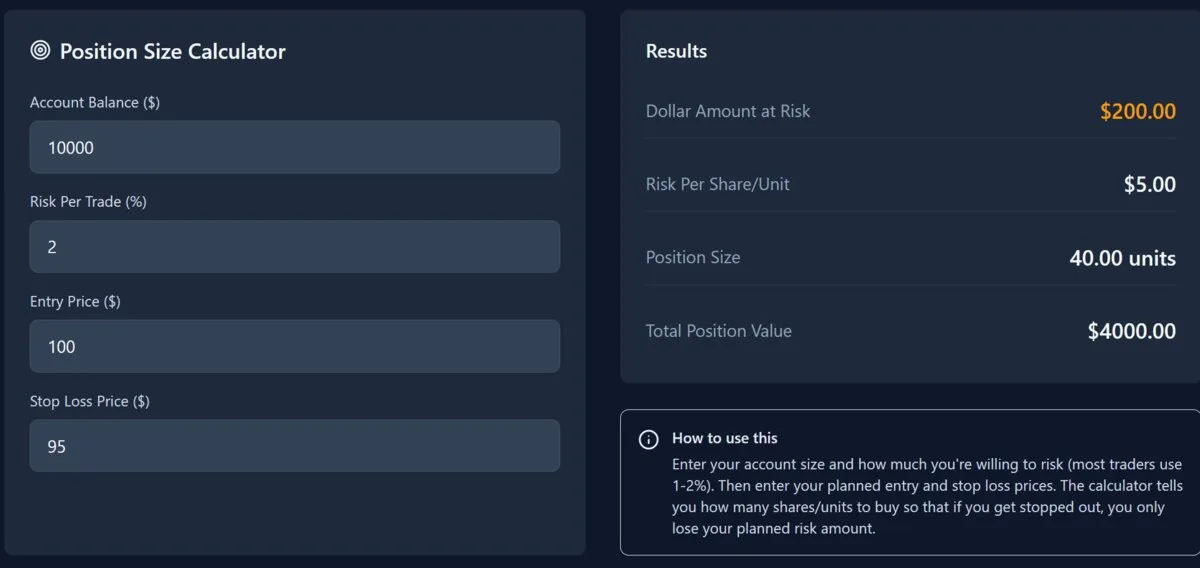
Nydar's position size calculator determines the right trade size based on your account balance, risk percentage, and stop loss distance
What Is Nydar's Position Size Calculator?
Nydar's Position Size Calculator determines how many shares or units to buy in a trade based on 3 inputs:
- Your total account balance
- The percentage of your account you're willing to risk
- The distance between your entry price and stop loss
The mathematical foundations of position sizing were established by J.L. Kelly Jr. in "A New Interpretation of Information Rate" (Bell System Technical Journal, 1956, vol. 35, pp. 917-926), which derived the optimal fraction of capital to wager given known odds. Van K. Tharp later adapted these principles for traders in Trade Your Way to Financial Freedom (McGraw-Hill, 2007), demonstrating that position sizing -- not stock selection -- explains 90% of the variation in portfolio returns. Ralph Vince extended this work in The Mathematics of Money Management (Wiley, 1992), formalising optimal-f calculations for leveraged trading.
How to Use Nydar's Calculator
Enter Account Balance
Enter your total trading capital into Nydar's calculator (e.g., $10,000)
Set Risk Percentage
Nydar defaults to 1-2% risk per trade, consistent with professional risk management standards
Enter Entry & Stop Loss
Nydar calculates position size from the distance between your planned entry price and stop loss
Nydar's Position Size Formula
Position Size = (Account × Risk%) ÷ (Entry - Stop Loss)
Example:
Account: $10,000 | Risk: 2% | Entry: $100 | Stop: $95
Nydar calculates: ($10,000 × 0.02) ÷ ($100 - $95) = $200 ÷ $5 = 40 shares
ATR-Based Position Sizing
Instead of using a fixed dollar stop loss, Nydar's Position Size Calculator also supports the Average True Range (ATR) method, which sets stops based on actual market volatility.
Stop Distance = ATR × Multiplier (typically 1.5-2x)
Position Size = (Account × Risk%) ÷ Stop Distance
Example:
Account: $10,000 | Risk: 2% | Stock at $100 | ATR: $3 | Multiplier: 2×
Stop Distance = $3 × 2 = $6 | Position = $200 ÷ $6 = 33 shares
Nydar's ATR method automatically adjusts position size for volatility — you'll buy fewer shares of volatile stocks and more of stable ones.
Nydar's Position Sizing by Account Size
Nydar's recommended risk management rules scale with account size:
| Account Size | Risk Per Trade | Max Positions | Notes |
|---|---|---|---|
| Under $5,000 | 1% | 2-3 | Capital preservation is priority |
| $5,000-$25,000 | 1-2% | 3-5 | Standard risk management |
| $25,000-$100,000 | 1-2% | 5-10 | Room for diversification |
| $100,000+ | 0.5-1% | 10-20 | Lower risk % as capital grows |
Nydar's 6% Portfolio Rule
Beyond individual trade risk, Nydar recommends capping your total portfolio risk. If your open positions combined could lose more than 6% of your account, you have too much exposure.
Example:
Account: $10,000 | 6% max = $600 total risk
If risking 2% ($200) per trade, Nydar's rule limits you to a maximum of 3 trades simultaneously.
If Nydar's Portfolio Analytics shows 3 open positions, wait for one to close (or move stops to breakeven) before adding a 4th.
Nydar's Risk Management Tips
- Nydar recommends never risking more than 1-2% per trade
- Always use a stop loss — Nydar's calculator factors this in automatically
- Account for slippage — Nydar's data reflects theoretical fills, not guaranteed execution
- Consider correlation — use Nydar's Correlation Matrix to check if similar positions compound risk
Related Nydar Topics
How Position Size Calculator Compares to Other Nydar Widgets
| Feature | Position Size Calculator | Risk/Reward | Risk Analytics | Portfolio Analytics |
|---|---|---|---|---|
| Primary focus | How many shares to buy | Reward vs risk ratio | Portfolio-level risk | Overall returns |
| Input required | Balance, risk %, stop loss | Entry, stop, target | Open positions | Trade history |
| Pre-trade tool | Yes | Yes | No (post-trade) | No (post-trade) |
| ATR support | Yes (1.5-2x multiplier) | No | No | No |
| Accounts for correlation | No (single trade) | No (single trade) | Yes | Yes |
| Real-time data | Manual entry | Manual entry | Live via WebSocket | Live via WebSocket |
| Best used for | Pre-trade sizing | Setup evaluation | VaR / drawdown | Performance review |
Further Reading
Last reviewed: February 2026