Alerts
Nydar's alerts system supports 14 condition types with multi-condition AND logic, cross-asset monitoring, and Telegram delivery
What Is Nydar's Alerts Widget?
Nydar's Alerts widget lets you set price-above or price-below notifications for any symbol on your Nydar watchlist. When price hits your target level, Nydar notifies you instantly via in-app notification or Telegram. Nydar's alerts persist until triggered or manually deleted, so you won't miss a move while away from the screen.
The discipline behind alert-based trading is grounded in Alexander Elder's Trading for a Living(Wiley, 1993), which argues that removing screen-watching reduces emotional decision-making — one of the largest sources of trading losses. Elder's "triple screen" system relies on pre-set price levels across multiple timeframes, exactly the workflow Nydar's alert system is designed to support. For a modern quantitative take, see Ernest Chan, Quantitative Trading (Wiley, 2009), which covers automated signal generation and threshold-based execution.
How Do I Set a Price Alert?
To set a price alert on Nydar, select a symbol, choose "Price Above" or "Price Below" as the condition, enter your target price, and click create. Nydar fires the alert once when the condition is met and sends notifications to your chosen channels. The entire setup takes under 10 seconds in Nydar's interface.
Step 1: Select Symbol
Choose the symbol you want to monitor from your Nydar watchlist.
Step 2: Choose Condition
Select when to trigger: "Price Above" (triggers when price rises above target) or "Price Below" (triggers when price falls below target).
Step 3: Set Target Price
Enter the exact price level where you want to be alerted.
Step 4: Create
Click "Create Alert" and it will appear in your Nydar active alerts list.
Alert Types
Price Above
Nydar triggers this alert when price rises above your target. Use for: breakout alerts, take-profit reminders, or watching for resistance breaks.
Price Below
Nydar triggers this alert when price falls below your target. Use for: buying opportunities, stop-loss warnings, or support break alerts.
What Are the Best Ways to Use Price Alerts?
The most effective price alert strategy is setting three alerts per trade: one at your planned entry level, one slightly above your stop loss as an early warning, and one at your profit target. This approach keeps you informed at every decision point without constant screen watching.
Entry Alerts
Set alerts at your planned entry levels. If BTC is at $65,000 and you want to buy at $60,000 support, set a "Price Below $60,500" alert to notify you when it's approaching.
Breakout Alerts
Set alerts above resistance levels. If ETH is ranging below $4,000 resistance, set a "Price Above $4,050" alert to catch the breakout.
Stop Loss Warnings
If your mental stop is at $50,000, set an alert at $50,500 to give yourself time to evaluate before the stop is hit.
Take Profit Reminders
Set alerts at your profit targets so you don't miss the exit while away from the screen.
Alert Strategy Planning
Don't set alerts randomly. Build a structured alert plan around your trading strategy:
For Each Position
Set three alerts: one at your planned entry level, one slightly above your stop loss (early warning), and one at your profit target. This keeps you informed at every decision point without constant screen watching.
For Watchlist Symbols
Set alerts at key support and resistance levels for symbols you're watching but haven't entered yet. When the alert triggers, you know it's time to look at the chart and decide.
For Market Conditions
Set alerts on major indices or Bitcoin as a market health indicator. A "BTC below $55,000" alert helps you stay aware of broader market shifts without constant monitoring.
What Is the Difference Between Alerts and Alert Builder?
Nydar provides two alert tools. Use the right one for your needs:
Alerts Widget (this page)
Nydar's simple price-above or price-below alerts. Quick to set up. Best for straightforward price level monitoring.
Nydar's multi-condition alerts using AND/OR logic. Combines price, indicators, and volume. Best for complex trading setups.
Can I Receive Alerts on My Phone?
Yes. Nydar delivers alert notifications to Telegram, so you receive them on your phone instantly when triggered. Connect your Telegram account in Nydar's Settings page, and every price alert fires a message to your chat. You don't need to keep the Nydar dashboard open.
Configure Telegram notifications to receive alerts on your phone:
- Set TELEGRAM_BOT_TOKEN in backend environment
- Start a chat with your bot on Telegram
- Configure your chat ID in settings
- Alerts will be sent to your Telegram automatically
Managing Alerts
Viewing Active Alerts
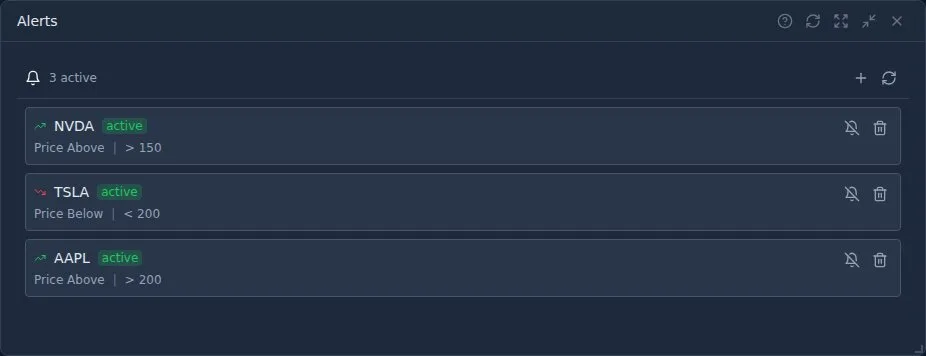
Nydar's Alerts widget lists all your active alerts showing symbol, condition, and target price.
Deleting Alerts
Click the X button on any alert to remove it. Nydar automatically removes triggered alerts unless set to repeat.
Pro Tips
- Buffer your levels: Set Nydar alerts slightly before key levels to give yourself reaction time.
- Use round numbers: Many traders watch $50,000, $100,000 etc. Set alerts near these levels.
- Multiple alerts per setup: Set one at your entry, one at stop, one at target.
- Clean up regularly: Remove old alerts for levels that are no longer relevant.
How Does This Widget Compare to Other Nydar Widgets?
Nydar offers several widgets that help you monitor the market and act on opportunities. Here is how they differ:
| Feature | Alerts | Alert Builder | Signals & Levels | Daily Picks | Scanner |
|---|---|---|---|---|---|
| Price threshold alerts | Yes — above/below | Yes — with AND/OR logic | No | No | No |
| Multi-condition logic | No — single condition | Yes — 14 condition types | No | No | Filter-based |
| Telegram delivery | Yes | Yes | No | No | No |
| Auto-generated signals | No — manual setup | No — manual setup | ML-powered signals | Daily ML picks | Criteria-based scans |
| Support/resistance levels | No | No | Auto-detected | No | No |
| Best for | Quick price level monitoring | Complex multi-factor alerts | Discovering trade setups | Daily trade ideas | Screening across markets |
Learn More
Related Widgets
Further Reading
Last reviewed: March 2026. Nydar's Alerts widget supports all 400+ symbols across crypto, stocks, and forex.