Alert Builder
Nydar's alert builder creates custom alerts with 14 condition types, multi-condition AND logic, and Telegram delivery
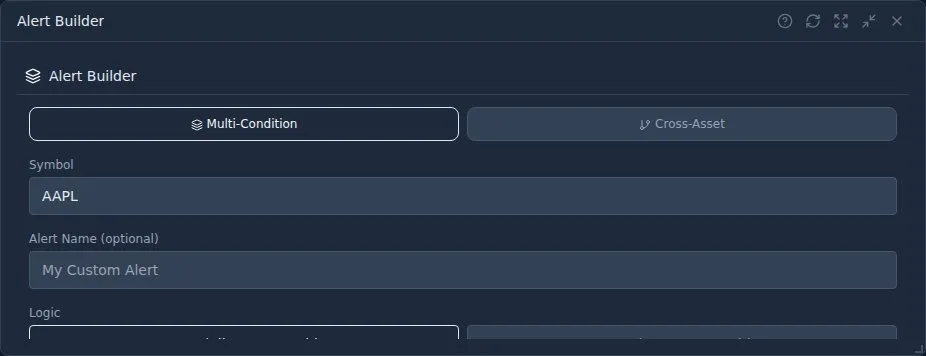
What Is Nydar's Alert Builder Widget?
Nydar's Alert Builder lets you create sophisticated alerts using multiple conditions and technical indicators across crypto, stocks, and forex. Get notified via in-app notification, email, or Telegram when your exact criteria are met. As Alexander Elder argued in Trading for a Living (1993), disciplined traders define their entry criteria in advance rather than reacting emotionally to price moves — Nydar's Alert Builder enforces that discipline automatically.
John Murphy's Technical Analysis of the Financial Markets (1999) established that combining indicators from different categories — trend, momentum, and volume — produces more reliable signals. Nydar's multi-condition alerts are designed around this principle, letting you combine a trend filter (e.g., price above 200 MA) with a momentum trigger (e.g., RSI crossing 30) and a volume confirmation (e.g., volume spike above 200% average).
Nydar's Alert Types
Price Alerts
Nydar's Alert Builder triggers alerts when price crosses above/below a level, or reaches a percentage change threshold.
Technical Indicator Alerts
Nydar tracks RSI overbought/oversold, MACD crossovers, moving average crosses, and more.
Volume Alerts
Nydar detects unusual volume spikes, volume above/below average.
Compound Alerts
Nydar's compound alerts combine multiple conditions with AND/OR logic for precise setups.
Building an Alert in Nydar
1. Select Symbol
Choose the asset you want Nydar to monitor.
2. Add Conditions
Add one or more conditions in Nydar's builder. Each condition has a metric, operator, and value.
3. Set Logic
Choose AND (all conditions) or OR (any condition) for Nydar's multi-condition logic.
4. Choose Notification
Select how Nydar should notify you: in-app, email, Telegram, or all three channels.
5. Set Expiry (Optional)
Nydar's alerts can be one-time, repeating, or expire after a date.
Nydar's Available Conditions
Price Conditions
- Price crosses above/below a level
- Price change exceeds percentage threshold
- Price enters a range (between two levels)
Technical Indicator Conditions
- RSI crosses above/below a threshold (e.g., overbought at 70, oversold at 30)
- MACD line crosses above/below signal line
- Moving average crossovers (e.g., 50 MA crosses 200 MA)
- Bollinger Band breakouts (price touches upper/lower band)
Volume Conditions
- Volume exceeds percentage of average (e.g., 200% of 20-day average)
- Volume crosses above/below a fixed threshold
- Unusual volume spike detection
Example Nydar Alerts
Breakout Alert
Alert when stock breaks out with volume:
AAPL Price > $200 AND Volume > 150% AverageOversold Bounce
Alert when oversold with reversal signal:
RSI < 30 AND MACD Crosses Above SignalSupport Test
Alert when price approaches key support:
BTC Price < $65,000 AND Price > $64,500Nydar's Notification Channels
In-App
Nydar's real-time notification in the dashboard
Sent to your registered email
Telegram
Instant message to your Telegram
Common Mistakes
- Too many alerts: 50 active alerts means constant noise. You'll start ignoring them all, including the important ones. Keep it under 10-15 at a time.
- Setting alerts at current price: If BTC is at $65,000 and you set "Price Above $65,010", it'll trigger in seconds. Give meaningful distance from current price.
- Single-condition alerts on volatile assets: "RSI below 30" on crypto triggers constantly during corrections. Add a second condition (e.g., AND volume spike) to filter noise.
- Forgetting to delete old alerts: Alerts set weeks ago for levels that are no longer relevant clutter your list and waste attention.
- Not testing compound logic: AND vs OR logic makes a huge difference. "Price above $100 OR RSI above 70" triggers on either condition, which may be too broad.
Pro Tips
- Less is more: Too many alerts leads to alert fatigue. Focus on high-value setups.
- Use compound alerts: Single conditions trigger often. Add filters for better signals.
- Set realistic levels: Alerts too close to current price trigger immediately.
- Review and prune: Regularly delete old or irrelevant alerts.
- Mirror your trading plan: Set alerts at your planned entry, stop loss, and target levels so you're notified at each decision point.
Learn More
How the Alert Builder Compares to Other Nydar Widgets
| Feature | Alert Builder | Alerts | Signals | Scanner | Daily Picks |
|---|---|---|---|---|---|
| Purpose | Create custom alerts | View active alerts | ML-generated signals | Scan market filters | Curated daily ideas |
| User control | Full (14 condition types) | View/delete only | None (auto-generated) | Filter parameters | None (auto-generated) |
| Notification | In-app, email, Telegram | Display only | In-app | None | None |
| Multi-condition | Yes (AND/OR) | No | Yes (ML model) | Yes (filters) | Yes (ML model) |
| Asset classes | Crypto, stocks, forex | Crypto, stocks, forex | Crypto, stocks, forex | Stocks | Crypto |
| Best for | Precise entry setups | Alert management | Idea generation | Market screening | Quick trade ideas |
Related Widgets
Further Reading
Last reviewed: March 2026