News Widget
Nydar's news widget streams real-time market news with sentiment scoring and ticker-specific filtering
What Is Nydar's News Widget?
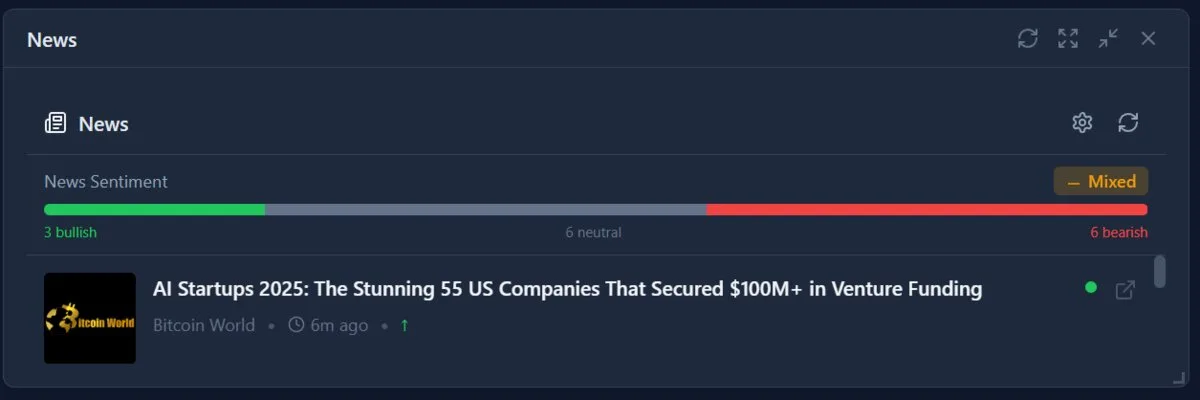
Nydar's News widget aggregates real-time financial news across 6 categories -- earnings, M&A, analyst upgrades, insider trading, SEC filings, and general news -- with automatic sentiment scoring on every headline. Nydar filters by the selected symbol or watchlist and highlights breaking stories so you can gauge market impact at a glance.
The link between media content and asset prices is well documented. Paul C. Tetlock's "Giving Content to Investor Sentiment: The Role of Media in the Stock Market" (Journal of Finance, 2007, vol. 62, no. 3, pp. 1139-1168) demonstrated that high levels of media pessimism predict downward pressure on stock prices and elevated trading volume. Loughran and McDonald's "When Is a Liability Not a Liability? Textual Analysis, Dictionaries, and 10-Ks" (Journal of Finance, 2011, vol. 66, no. 1, pp. 35-65) further showed that tone in financial filings predicts returns, volatility, and trading volume up to 3 days after publication.
Features
Symbol-Specific News
Nydar automatically filters headlines to show only articles relevant to your selected symbol or watchlist.
Sentiment Indicator
Nydar scores each headline with a sentiment indicator: bullish (green), bearish (red), or neutral (gray).
Source Filtering
Nydar lets you filter by news source to focus on your preferred outlets.
Real-Time Updates
Nydar refreshes news automatically via WebSocket. Breaking stories appear at the top with a highlight.
News Categories
How Nydar's Sentiment Scoring Works
Nydar automatically analyses each headline for sentiment -- whether the news is likely positive, negative, or neutral for the asset's price. Nydar's 3-tier sentiment indicator (bullish, bearish, neutral) helps you quickly gauge the tone without reading every article.
Bullish (Green)
Positive news: earnings beats, analyst upgrades, partnership announcements, positive regulatory developments, strong guidance, or insider buying.
Bearish (Red)
Negative news: earnings misses, analyst downgrades, lawsuits, regulatory crackdowns, management departures, or insider selling.
Neutral (Gray)
Informational news without clear directional impact: routine filings, conference attendance, minor product updates, or industry overviews.
Using Nydar's News in Trading
Pre-Market Prep
Check Nydar's overnight news before market open. Look for earnings, analyst actions, or major events that may set the tone for the day.
During Market Hours
Monitor Nydar for breaking news that could affect your positions. Set alerts in Nydar for key symbols and be ready to act if major news drops.
Sentiment Divergence
When Nydar's sentiment indicator doesn't match price action, it may signal a reversal. Bullish news + falling price can mean the market has already priced it in.
Catalyst Identification
Nydar surfaces major catalysts like FDA approvals, FOMC decisions, or merger announcements that can move prices 5-20%. Identifying these in Nydar before they hit helps you position accordingly.
Sector Contagion
Nydar's news feed shows how news affecting one company often impacts the entire sector. A chip shortage announcement for one manufacturer can move all semiconductor stocks.
Nydar's News-Driven Trading Strategies
Gap and Go
When strong news causes a stock to gap up at open, momentum traders look for continuation. Key requirement: the news must be genuinely significant (earnings beat, major contract win), not just hype.
Fade the Overreaction
Markets often overreact to news in the first 15-30 minutes. If a stock drops 8% on mediocre earnings (not terrible), it may bounce as cooler heads prevail. Wait for the dust to settle before entering.
Buy the Rumour, Sell the News
Prices often rise in anticipation of positive news, then fall when the news is confirmed. If a stock has already rallied 15% "on rumours of a deal", the actual announcement may trigger a sell-off.
Important Notes
- News is often priced in: By the time you read it in Nydar, markets may have already moved.
- Verify sources: Not all news is accurate. Cross-reference important stories outside Nydar.
- Avoid overtrading: Don't chase every headline Nydar surfaces. Focus on significant news.
- Nydar's sentiment isn't perfect: Nydar's sentiment scoring can miss context and sarcasm -- always verify with the full article.
Pro Tips
- Focus on catalysts: Nydar highlights earnings, FDA decisions, and Fed meetings as high-impact events.
- Watch sector news: News affecting one company often impacts the whole sector.
- Time your trades: Avoid entering right before major news releases.
- Use with Nydar's charts: Correlate news events with price action patterns in Nydar's chart widget.
Learn More
Related Widgets
How News Widget Compares to Other Nydar Widgets
| Feature | News | Fear & Greed Index | Reddit Sentiment | Alerts |
|---|---|---|---|---|
| Primary focus | Real-time headlines | Aggregate market mood | Social media chatter | Price/event triggers |
| Sentiment scoring | Per-headline (3-tier) | Single index (0-100) | Per-post | No |
| Symbol-specific | Yes (auto-filter) | No (market-wide) | Yes (per ticker) | Yes (per symbol) |
| Data source | Professional news feeds | Multi-factor index | Reddit API | Price + indicators |
| Categories covered | 6 (earnings, M&A, etc.) | 1 (composite) | Subreddit-based | User-defined |
| Update frequency | Real-time (WebSocket) | Hourly | Every 5 minutes | Real-time |
| Best used for | Catalyst identification | Contrarian signals | Retail crowd mood | Automated notifications |
Further Reading
Last reviewed: March 2026